
Tasks, wallpapers and themes
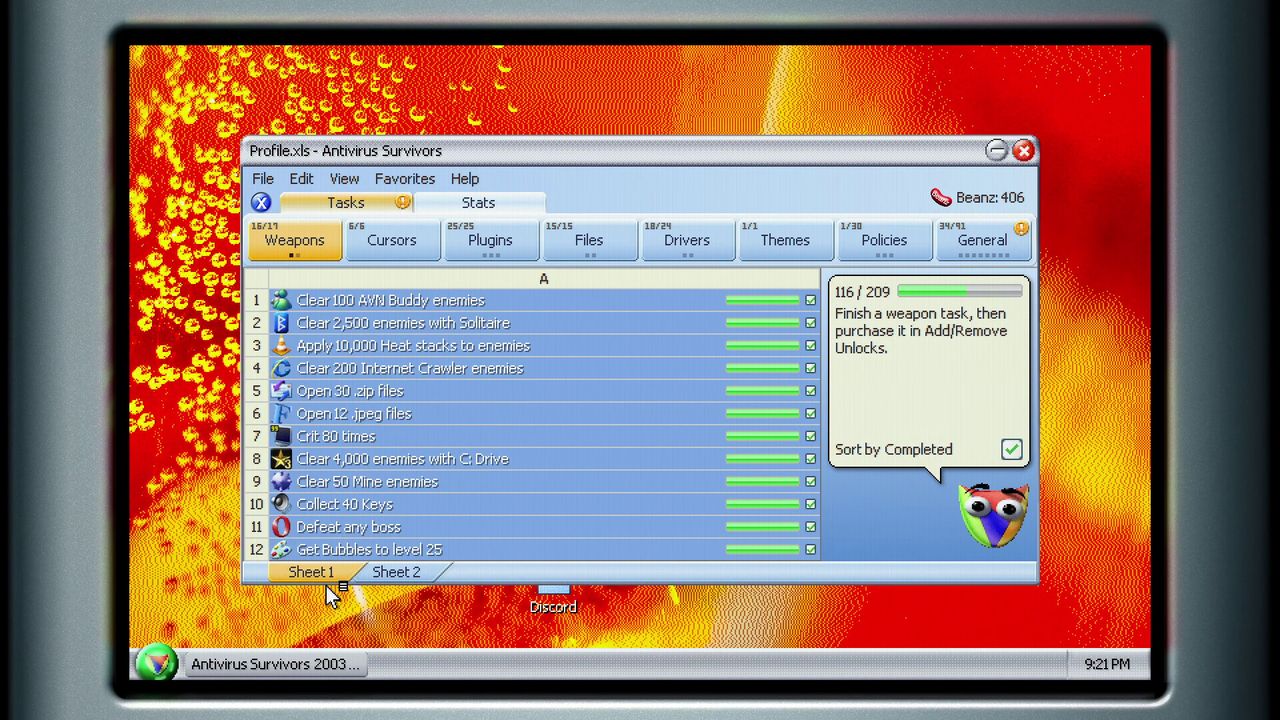
Tasks are the long tail of Antivirus Survivors 2003 Professional: side objectives that run alongside a normal session and unlock files, weapons and plugins when they complete. The release build ships 200+ of them. The demo already has a working task panel with its own categories and progress counters.
The important thing about tasks is that they are the one system you can safely ignore for a run and still bank progress on. They are also the one system that punishes you if you chase them at the wrong moment.
How the panel works
The task panel groups objectives and tracks progress counts — the demo build shows a mix of kill-count tasks, folder-opening tasks, key-collection tasks and unlock objectives, sorted into tabs, with per-category totals. The release build's full list is 200+, and the store page describes the reward as unlocking new Files, Weapons, Plugins and more.
Task types visible in the demo panel follow a few clear shapes:
- Kill counts by enemy type — for example clearing a set number of a named enemy.
- Action counts — opening a set number of folders, collecting a set number of keys.
- Unlock objectives — reaching a specific weapon or item, including ones tied to named drops.
- Spend objectives — completing purchases in in-run shops.
Because the counts are cumulative across runs, tasks are the one progression track that behaves like a spreadsheet rather than a session. You can play normally and watch the bars move.
The right way to approach them
- Never build around a task. A run that exists to open thirty folders is a run that dies early and banks nothing. Take tasks as they fall out of play you would do anyway.
- Check the panel between runs, not during. It is a progress readout, not a decision aid.
- Prioritise the ones that unlock content. The store page is specific that tasks unlock Files, Weapons, Plugins and more — those rewards feed directly back into every future run, which makes them worth a deliberate push once your build is stable.
- Let kill-count tasks finish themselves. Enemy-type counts tick up while you are doing something else useful.
Wallpapers, themes and the desktop
The cosmetics system is bigger than it sounds. The release build has 81 wallpapers and 8 themes, and the way you unlock wallpapers is by opening .png and .jpeg files during runs — which means cosmetic progress is traded against run-time resources.
From the release notes: open image files to unlock wallpapers and profile pictures, then mix and match them with different themes "if you're tired of the classic blue".
That last phrase is the joke the game is built on — the classic blue is the point — but the feature is real. Themes change the look of the desktop you play on, and wallpapers change the background. It is a small thing that makes a long grind feel less identical run to run.
A practical note: if you are not opening image files specifically, you are sitting on locked wallpapers. The demo's task panel shows a themes category with its own counter, so the completion state is tracked visibly.
Enemy knowledge worth having
Task lists are also the best enemy census the game publishes. The demo's task panel names enemy types you will otherwise learn the hard way, including the AVSN Messenger Buddy — a near-stationary ranged enemy added in Demo 1.2 that shoots smileys which knock you back — and the International Crawler.
Messenger Buddy's design is a good example of the game's enemy language: almost immobile, ranged, and its projectile has knockback. It is not a threat because of its damage, it is a threat because it pushes you into whatever else is on the screen.
Where cosmetics stop mattering
They stop mattering for your build. Walls and themes are pure expression, and no unlock in the cosmetic track changes a stat. If you are measuring progress by power rather than by collection, the task track's real value is the Files/Weapons/Plugins unlocks, and the wallpapers are a bonus you collect on the way past.
The fastest way to make tasks irrelevant to your decision-making is to build a run that opens a lot of files anyway — see files, folders and BigWave — because that single habit completes several task categories while you are doing the thing you wanted to do regardless.